
What Does an ECU Tuning Tool Actually Do?
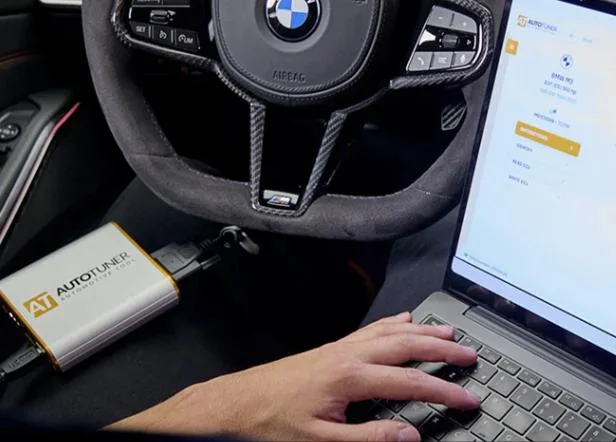
An ECU tuning tool communicates with a vehicle’s electronic control units.
Depending on the controller and the available protocol, the tool may allow a workshop to:
- identify the ECU or TCU and its software version;
- read the original calibration;
- obtain a virtual read where a physical read is unavailable;
- write a modified calibration;
- restore the original software;
- access internal flash or EEPROM memory;
- perform cloning or replacement-controller procedures;
- recover certain interrupted or failed programming operations.
The tuning tool itself does not develop the calibration.
It provides access to the control unit so that an original or modified file can be read and written.
The quality of the completed job depends on three separate elements working together.
The programming tool
The tool must communicate reliably with the control unit and provide the correct instructions, connection method and programming procedure.
The calibration
The calibration determines how the engine or transmission behaves after programming.
A professional calibration should account for the specific controller, software version, vehicle configuration, mechanical condition and intended use.
The workshop
The workshop remains responsible for the vehicle and the completed job.
That includes correctly identifying the vehicle, checking its mechanical condition, maintaining stable voltage, supplying accurate information, following the programming instructions, validating the result and deciding whether the vehicle is fit to be returned to the customer.
A quality calibration provider can supply valuable expertise and technical assistance, but using a file provider does not transfer responsibility for the vehicle away from the workshop performing the work.
ECU Tuning Is Not Only About Peak Power
Increased engine output often receives the most attention, but professional ECU and TCU calibration can affect much more than maximum horsepower.
Depending on the vehicle and application, calibration may improve:
- engine drivability;
- torque delivery;
- throttle response;
- turbocharger behaviour;
- towing performance;
- transmission shift timing;
- gear-selection strategy;
- torque-converter lock-up behaviour;
- response under changing load;
- commercial or fleet operation.
For many customers, better drivability and more predictable transmission behaviour provide a greater everyday benefit than a peak dyno figure.
Professional tuning should be approached as vehicle optimisation rather than simply an attempt to produce the largest possible power increase.
How Professional Tuning Platforms Are Structured
Most professional tuning platforms perform the same basic task: they provide a controlled way to communicate with ECU and TCU software.
The differences generally fall into several areas.
Vehicle coverage
Each platform supports a different combination of manufacturers, controllers, software versions and programming methods.
Coverage also changes regularly as new protocols are released.
A tool with the longest overall vehicle list is not necessarily the best tool for your workshop. What matters is whether it supports the vehicles and controllers that regularly come through your doors.
Programming methods
Depending on the control unit, the tool may support:
- OBD programming;
- Bench programming;
- Boot programming;
- remote or mail-in unlocking;
- virtual reads;
- direct physical reads;
- full backups;
- cloning or recovery functions.
The availability of a particular method can vary between tools, even when they support the same vehicle.
Licensing
Professional platforms may be sold as:
- Master;
- Slave;
- modular or protocol-based licences;
- vehicle-category packages;
- subscription-based packages;
- perpetual licences with free updates;
- combinations of the above.
The same hardware platform may be configured very differently through its software licence.
Flex states that its Master and Slave units use the same hardware and that the main difference is the software licence. AutoTuner and KESS3 likewise distinguish Master and Slave workflows through file access and account structure rather than presenting them as entirely different programming devices.
This does not mean that AutoTuner, Flex and KESS3 all use the same hardware as each other. They remain separate products with different designs, software, accessories, coverage and support systems.
It means that, within a given product family, the difference between Master and Slave is commonly achieved primarily through licensing and file access.
Commercial workflow
The biggest distinction is often not technical.
It is how the workshop intends to obtain and manage its calibration files.
That is where the Master and Slave business models differ.
OBD, Bench and Boot Programming
Modern control units cannot all be programmed in the same way.
The required method depends on the controller, vehicle, software version, security level and protocol offered by the tool manufacturer.
OBD programming
OBD programming is performed through the vehicle’s diagnostic connector without removing the ECU or TCU.
Where supported, it is generally the quickest and least invasive method.
Advantages
- No controller removal.
- Reduced labour.
- Convenient workshop workflow.
- Suitable for many routine tuning jobs.
- Less risk of physical damage to the control unit.
Considerations
- Not available on every controller.
- Some control units require a separate unlock before OBD writing is possible.
- Some protocols use a virtual read rather than physically reading the calibration from the vehicle.
- Programming voltage must still remain stable.
- OBD support may depend on ECU software version rather than vehicle model alone.
A listing for a particular model does not guarantee that every vehicle of that model can be programmed identically.
Always identify the fitted control unit and check the current protocol instructions before beginning.
Bench programming
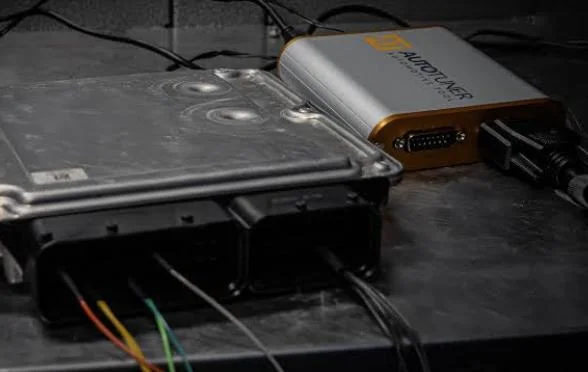
Bench programming usually requires the ECU or TCU to be removed from the vehicle.
The controller generally remains sealed, with the tuning tool connected through the external ECU pins using a dedicated harness or pinout.
Advantages
- Direct communication with the controller.
- Often provides greater access than OBD.
- No need to open the housing on many ECUs.
- Useful for programming, recovery and some cloning procedures.
- Can provide an alternative where OBD programming is unavailable.
Considerations
- Additional labour is required to remove and reinstall the controller.
- Correct pin identification is essential.
- A suitable regulated power supply is required.
- Incorrect connections can damage the ECU, tool or communication interface.
- Bench mode is not automatically safer or faster for every controller.
Bench programming should be treated as an electronics procedure, not simply as an extension of connecting a scan tool.
Boot programming
Boot mode normally requires the ECU or TCU to be opened and connections made directly to the circuit board.
Depending on the controller, this may involve test pads, boot pins, processor connections or other access points.
Advantages
- Deep access to internal memories.
- Useful for full backups.
- Can support cloning and repair work.
- May provide recovery options where OBD or Bench access is insufficient.
- Sometimes required for protected or damaged control units.
Considerations
- The controller usually has to be opened.
- Physical damage can occur during opening, probing or resealing.
- Incorrect connections can damage board components.
- Proper magnification and electronics-handling equipment may be required.
- Environmental sealing must be restored correctly.
- Boot access does not remove the need for stable power or correct file handling.
AutoTuner, Flex and KESS3 all provide combinations of OBD, Bench and Boot support, but the available connection mode varies by controller and current licence coverage.
Workshop tip: Before comparing total protocol numbers, list the vehicles and control units your workshop sees most often. Relevant coverage matters more than the longest overall vehicle list.
Master vs Slave ECU Tuning Tools
Master and Slave tools often perform the same programming operation at the vehicle.
Both may identify, read and write the same control unit using the same connection method.
The major difference is what happens to the file.
What is a Slave tool?
A Slave tool is linked to a nominated Master account or calibration provider.
The Slave workshop reads the vehicle and sends the encrypted file to its Master. The Master accesses or decrypts the file, develops the calibration and returns a modified encrypted file that the linked Slave tool can write.
The Slave operator generally cannot open or independently edit the calibration file.
AutoTuner describes its Slave files as encrypted and editable only by the Master to which the tool is linked. Flex similarly states that its Slave users work with encrypted files and must send modification requests through their linked Master. KESS3’s workflow also directs Slave users to send their read file to their reference Master for modification.
Advantages of a Slave tool
A quality Slave arrangement can provide:
- lower initial purchase cost;
- lower annual licence costs where subscriptions apply;
- no immediate need for calibration-editing software;
- access to an experienced calibration provider;
- assistance with file selection and revisions;
- a simpler entry into commercial tuning;
- fewer software-development requirements;
- more time for the workshop to concentrate on vehicles and customers.
For many mechanical workshops, a Slave tool is not an inferior option.
It is a practical division of labour.
The workshop manages the customer, vehicle assessment, programming and validation. The Master provides the calibration-development service.
A workshop does not need to become a software developer before it can offer professional tuning, just as it does not need to manufacture every component it installs.
Limitations of a Slave tool
The lower cost and additional support come with dependency.
The Slave workshop may rely on its Master for:
- calibration quality;
- file turnaround;
- revisions;
- technical communication;
- support during difficult jobs;
- access to modified files;
- availability outside normal hours;
- assistance when the initial result is unsuitable;
- cooperation when changing providers.
The tool may be working perfectly while the overall service still fails the workshop.
That is why choosing the Master is at least as important as choosing the programming platform.
Slave workflow
Master workflow
The Cost of Choosing the Wrong Master
A poor Master relationship can become expensive very quickly.
The immediate file price is only one part of the real cost.
Problems may include:
- unsuitable or overly generic calibrations;
- repeated revisions;
- poor throttle or torque behaviour;
- unresolved drivability complaints;
- slow communication;
- excessive vehicle downtime;
- repeated road testing;
- duplicated workshop labour;
- refunds or discounted jobs;
- unhappy customers;
- damage to the workshop’s reputation;
- limited help during a failed or interrupted programming operation.
A file that is $50 cheaper is not a saving if the vehicle occupies a workshop bay for another day or returns repeatedly with unresolved concerns.
A good Master should be viewed as a technical and commercial partner rather than simply a low-cost file supplier.
Questions to ask a prospective Master
Before linking a Slave tool, discuss:
- Who actually develops the calibrations?
- Are files developed in-house or resold from another provider?
- What information is required with each job?
- What are the normal turnaround times?
- Are revisions included?
- Is datalog review available?
- What happens when the initial result is unsuitable?
- What support is available during programming or recovery problems?
- How are original and modified files stored?
- Do purchased credits expire?
- Is support available outside the provider’s normal time zone?
- What happens if the commercial relationship no longer works?
- What fees apply if the Slave is moved elsewhere?
- Will the provider release the tool once legitimate accounts and transfer costs are settled?
The cheapest Master is not necessarily the least expensive Master to work with.
Can a Slave Tool Change Masters?
Transfer rules differ between manufacturers and providers.
Depending on the platform, changing Masters may require:
- approval or release from the existing Master;
- a manufacturer or distributor transfer fee;
- settlement of outstanding accounts;
- connection to the new Master account;
- conversion of existing files;
- loss of compatibility with files read under the previous relationship.
Transfer requirements vary between platforms. AutoTuner and Flex require release or approval from the existing Master, while KESS3 transfer requirements should be confirmed with the current Master, dealer or Alientech before purchase.
This is not a detail to discover after the relationship has deteriorated.
Discuss the release process before purchasing the tool and, where possible, have the commercial understanding recorded in writing.
A quality Master should expect to retain workshops through file quality, support and service—not by making departure unnecessarily difficult.
Provided outstanding accounts and legitimate manufacturer or transfer charges have been settled, a professional provider should be prepared to release a workshop whose needs are no longer being met.
That is a commercial expectation rather than a universal manufacturer rule, so it should be confirmed directly with the proposed Master before the tool is linked.
Responsibility Remains With the Workshop
Using a Slave tool does not transfer responsibility for the vehicle to the Master provider.
The workshop carrying out the job remains responsible for:
- confirming the vehicle is mechanically suitable for tuning;
- identifying pre-existing faults;
- checking that the correct vehicle and controller have been selected;
- maintaining stable power during programming;
- following the tool manufacturer’s instructions;
- supplying accurate vehicle and modification details;
- checking diagnostic trouble codes before and after programming;
- conducting appropriate road testing or datalogging;
- assessing the completed result;
- deciding whether the vehicle is fit to be released.
The Master is responsible for the calibration service supplied.
The workshop remains responsible for the vehicle, the programming process and the completed job delivered to the customer.
That responsibility exists whether the workshop uses a Slave or Master tool.
What Is a Master Tool?
A Master tool provides access to a usable, unencrypted or editable file.
Depending on the platform, this allows the Master user to:
- develop calibrations in-house;
- send files to an independent calibration provider;
- use compatible editing software;
- maintain direct control of original and modified files;
- build a network of linked Slave users;
- supply files under its own business model.
AutoTuner states that Master users receive non-encrypted files that can be modified independently or sent to any chosen file provider. Flex describes its Master files as files that can be edited using appropriate software. KESS3 likewise distinguishes its Master workflow by allowing the user to modify the read file independently.
Advantages of a Master tool
- Greater control over calibration files.
- Freedom to use different file providers.
- Ability to develop files in-house.
- Ability to build a Slave network.
- Less commercial dependence on one provider.
- Greater opportunity to build calibration intellectual property.
- Potentially higher margins where the business genuinely has development capability.
Considerations
- Higher initial purchase cost.
- Often higher annual subscriptions where applicable.
- Calibration software may be required.
- Training and development costs can be substantial.
- The workshop must arrange its own file support.
- Greater file access does not automatically provide greater calibration competence.
- Building a Slave network creates additional service and support obligations.
A Master tool provides freedom of file access.
It does not automatically make its owner a calibrator.
Professional calibration development requires mechanical knowledge, software skills, accurate definitions, datalog interpretation, controlled testing and an understanding of the strategy used by the specific ECU or TCU.
A workshop using a Master tool but outsourcing every calibration can still operate successfully. The commercial advantage is that it can choose between providers rather than being technically linked to only one.
Understanding Purchase Price, Licensing and Subscriptions
Two tools with similar purchase prices can have very different ownership costs over several years.
Compare the entire package rather than the price of the hardware case.
Initial purchase cost
The advertised starting price may not include every vehicle category or activation required by the workshop.
Check whether the quoted package includes:
- Master or Slave licensing;
- car and light-commercial coverage;
- truck or agricultural coverage;
- motorcycle or marine coverage;
- ECU and TCU programming;
- OBD, Bench and Boot access;
- cables and adapters;
- support or training;
- freight and tax;
- first-year subscription.
Annual subscriptions
Some platforms require annual subscriptions to maintain access to updates, new protocols, support, warranties or particular online services.
Master subscriptions are commonly more expensive than Slave subscriptions because of the additional file access and commercial capability.
The effect of an expired subscription differs between manufacturers. Some tools may continue to use protocols already activated, while newer protocols, online functions or support services become unavailable.
The specific expiry conditions should be confirmed before purchase.
No-subscription platforms
AutoTuner currently advertises free software and vehicle-list updates without an annual tool subscription.
That can make ongoing ownership costs predictable, particularly for a workshop completing a relatively small number of jobs each year.
It should not be interpreted as meaning that every future accessory, external unlock or calibration file is free.
Modular licensing
Platforms such as KESS3, BitBox and PCMFlash can be configured through activations, categories or individual modules.
This allows a workshop to buy coverage relevant to its work rather than purchasing every available protocol immediately.
The advantage is lower entry cost for targeted work.
The disadvantage is that coverage can become fragmented, and additional modules, interfaces or adapters may be required as the workshop’s workload expands.
Comparing Common Professional Platforms
There is no permanent overall winner.
Coverage, security access and programming methods change as new vehicles and protocols are released.
The correct comparison starts with the workshop’s real workload.
AutoTuner
AutoTuner may appeal to workshops looking for:
- an integrated OBD, Bench and Boot platform;
- a straightforward operating workflow;
- Master and Slave licensing options;
- no annual tool subscription;
- broad passenger and light-commercial coverage;
- predictable ongoing ownership costs.
Things to consider:
- A Slave is tied to its nominated Master.
- Changing Masters requires release approval.
- Calibration editing software is not included with a Master.
- Coverage should be checked against the exact controllers the workshop expects to see.
- A separate tool may still be required for unsupported or specialised applications.
Flex
Flex may appeal to workshops looking for:
- configurable Master or Slave software packages;
- OBD, Bench and Boot capability;
- ECU and TCU programming;
- repair, cloning and recovery-oriented workflows;
- configurable passenger and heavy-duty licensing;
- access to the wider Magic Motorsport ecosystem.
Things to consider:
- Annual subscription costs.
- The exact protocol package being purchased.
- Master and Slave renewal differences.
- Certain services or newer protocols may require an active licence and subscription.
- Slave support requests may be expected to pass through the linked Master first.
KESS3
KESS3 may appeal to workshops looking for:
- OBD, Bench and Boot functions in one hardware platform;
- modular vehicle-category activations;
- passenger, motorcycle, marine, agricultural and heavy-duty options;
- Master and Slave configurations;
- integration with Alientech software and services;
- expansion of the package as the workshop’s needs grow.
Things to consider:
- Initial activation cost.
- Annual subscription cost.
- Which vehicle groups are included.
- Whether additional editing software is required.
- Which functions continue if the subscription expires.
- Whether the workshop needs broad category coverage or only a focused package.
BitBox
BitBox may suit workshops looking for:
- targeted modules for specific controller families;
- a lower-cost entry into selected makes or ECU types;
- OBD, Bench or Boot functions through supported modules;
- a modular system that can be expanded over time;
- use with compatible communication interfaces where required.
Things to consider:
- It is not an all-in-one hardware package in the same sense as AutoTuner, Flex or KESS3.
- The correct dongle, module, interface and bench equipment may all be required.
- Coverage must be checked at module level.
- Different modules can have different communication-hardware requirements.
- Support and workflow may be less unified than with a complete single-manufacturer kit.
PCMFlash
PCMFlash may suit workshops looking for:
- cost-effective, controller-specific modules;
- strong coverage in particular ECU or TCU families;
- use with established compatible interfaces;
- targeted Bench and Boot programming capability;
- gradual expansion through individual software modules.
Things to consider:
- It is licensed per module rather than sold as one universal coverage package.
- Hardware-interface compatibility varies by module.
- Additional cables, power-control equipment or adapters may be required.
- It rewards users who understand controller families and know exactly which modules they need.
- It may complement a primary professional tool rather than replace one for every workshop.
What Else Does a Workshop Need?
The tuning tool is only part of the startup cost.
A professional setup may also require:
- a reliable Windows laptop;
- regulated battery support;
- a suitable bench power supply;
- Bench and Boot harnesses;
- pin probes and breakout leads;
- ECU opening tools;
- resealing materials;
- antistatic equipment;
- magnification;
- diagnostic scan equipment;
- access to technical information;
- calibration-file credits;
- training;
- insurance;
- secure file storage and backups;
- workshop procedures for vehicle intake and validation.
Battery support
Programming voltage should not depend on an ageing battery charger or the unknown condition of the vehicle battery.
Use power support designed to maintain stable voltage throughout identification, reading and writing.
The required current capacity varies by vehicle and programming method.
Diagnostic equipment
A tuning tool does not replace a capable diagnostic scan tool.
The vehicle should be checked for existing faults before programming and assessed again afterwards.
Some tuning platforms include limited DTC or datalogging functions, but these are not necessarily a substitute for full diagnostic capability.
Bench and electronics equipment
Bench and Boot work may require:
- reliable pinout information;
- regulated power control;
- suitable probes;
- magnification;
- safe ECU opening;
- clean working conditions;
- correct resealing procedures.
A tool supporting Boot mode does not mean every workshop is immediately equipped to carry out invasive electronics work safely.
Common Mistakes When Buying a Tuning Tool
Buying solely on price
The cheapest tool can become expensive if it does not support the controllers your customers actually own.
Comparing only the number of protocols
A long vehicle list is less useful than reliable support for the workshop’s regular workload.
Choosing a tool before choosing a Master
For a Slave buyer, the provider can influence every commercial job completed with the tool.
Assuming Master is automatically better
A Master licence without calibration knowledge or a reliable file-supply plan may simply increase cost.
Ignoring annual ownership costs
Subscriptions, renewals, modules, editing software, file credits and technical support should all be included in the calculation.
Buying excessive coverage immediately
A workshop may spend heavily on categories it rarely uses.
It can be better to begin with the vehicles already present in the customer base and expand from earned revenue.
Failing to understand the read type
A virtual read, calibration read and full physical backup are not the same thing.
Understand exactly what the protocol provides and what is required if recovery becomes necessary.
Programming without stable voltage
An avoidable voltage drop can turn a routine write into a recovery procedure or damaged control unit.
Failing to assess the vehicle first
A remap will not repair a failing turbocharger, restricted fuel system, slipping transmission or unresolved diagnostic fault.
Failing to discuss Slave transfer terms
The ability to leave a poor commercial relationship should be discussed before entering it.
Questions to Ask Before Purchasing
- Which vehicles and controllers does my workshop see most often?
- Which of those vehicles are currently supported?
- Is the available method OBD, Bench or Boot?
- Is the read physical, virtual or calibration-only?
- Is a full backup available?
- Can the protocol recover an interrupted write?
- What is included in the base package?
- Which activations cost extra?
- Is the tool Master or Slave?
- Is there an annual subscription?
- What happens when the subscription expires?
- Are Master and Slave renewal costs different?
- Who will develop the calibration files?
- What is the normal file turnaround?
- Are revisions included?
- Is datalog review available?
- Who provides technical support during a difficult job?
- What recovery support is available?
- Can the Slave tool be transferred to another Master?
- Who must approve the transfer?
- What transfer fees apply?
- Will old files remain compatible after a transfer?
- Can the tool later be upgraded to Master?
- What training is included?
- What additional equipment is required?
- Which interface, cables and adapters are included?
- What warranty applies?
- Does the warranty depend on an active subscription?
- How frequently is the vehicle list updated?
- What is the realistic total cost over three years?
Quick Master vs Slave Comparison
| Consideration | Slave | Master |
|---|---|---|
| Initial investment | Generally lower | Generally higher |
| Annual licence cost | Often lower where applicable | Often higher |
| Editable file access | No | Yes |
| Calibration software needed | No | Usually, if editing in-house |
| File development | Linked Master provider | In-house or chosen provider |
| Choice of file provider | Restricted until transferred | Open |
| Technical support | Primarily through Master | Self-managed or purchased |
| Ability to supply Slave tools | No | Yes |
| Calibration knowledge required | Lower for file development | High if developing files |
| Responsibility for the vehicle | Workshop | Workshop |
| Commercial dependence | Higher | Lower |
| Business scalability | Workshop tuning service | Tuning service or file network |
Which Option Is Right for Your Workshop?
A supported Slave package is often the most practical option for a mechanical workshop that wants to add ECU tuning without immediately investing in calibration development.
It offers a lower entry cost, access to an experienced file provider and a simpler commercial workflow.
The quality of that arrangement depends heavily on the Master relationship.
A Master package may be appropriate for a business that:
- already develops calibrations;
- intends to invest seriously in calibration training;
- requires unrestricted access to its files;
- wants to use several independent file providers;
- plans to build a network of Slave workshops;
- wants greater long-term control over its calibration workflow.
Some workshops may purchase a Master simply to retain the freedom to choose file providers while continuing to outsource calibration development.
That can be a valid model, provided the additional tool and subscription costs make commercial sense.
Neither Master nor Slave is inherently superior.
The correct choice depends on how the workshop intends to operate.
Final Advice
Do not choose a tuning platform solely because another workshop owns one, because it has the longest protocol list or because its initial purchase price is attractive.
Start with the vehicles you work on and the service you want to provide.
Then compare the complete package:
- relevant vehicle coverage;
- OBD, Bench and Boot access;
- Master or Slave licensing;
- annual subscriptions;
- included accessories;
- calibration-file costs;
- technical support;
- training;
- recovery assistance;
- transfer arrangements;
- total ownership cost.
The tuning tool provides access to the control unit.
The workshop procedures, calibration quality and support network behind it determine what you can reliably deliver to the customer.
Choose your Master as carefully as you choose your tool.
South West Tuning Co.
South West Tuning Co. supplies and supports professional ECU tuning equipment for workshops throughout Western Australia.
As the official AutoTuner dealer for Western Australia, we can help assess your expected workload, vehicle coverage, Master and Slave options, bench-equipment requirements and the commercial setup that best suits your workshop.
Speak with us before investing in your first tool or expanding your existing tuning capability.